Application Architecture
Designing a modular and componentized Nuxt 3 application using Nuxt Layers is a powerful way to create a scalable and extensible architecture. Nuxt Layers allow you to separate your core functionality from additional features, enabling you to build a base application that can be easily extended by adding new plugins or components, following a common interface to ensure conformity.
Goals of the Architecture
- Separation of Concerns
Keep the core functionality of the base application separate from the extensible features. - Modular Structure
Design the application so that new functionality can be added easily without modifying the core. - Extensibility with Nuxt Layers
Use Nuxt Layers to organize and structure different parts of the application. - Common Interface for Plugins
Define a base interface that all plugins must implement to ensure seamless integration with the UI. - Runtime Activation
Support the ability to activate or deactivate plugins or components at runtime.
Here's an outline of the architecture that meets these requirements:
1. Core Architecture Overview
The core architecture of your Nuxt 3 application will consist of several layers and well-defined components that serve as the foundation. The key focus areas include:
- Base Application Framework: The main Nuxt 3 application with core functionality and features.
- Modular Components: Components designed with a clear interface to ensure they can be easily extended or replaced.
- Plugin System: A mechanism to allow dynamically loadable plugins that can be activated or deactivated at runtime.
- Common Interface Contracts: Define standard interfaces for plugins and components to ensure consistent integration with the base UI.
2. Project Structure
The project structure should be organized to promote modularity and maintainability. Here is a proposed directory structure for your Nuxt 3 application:
/base-layer                  # Core functionality, design system and UI components
  /components                # Base components (UI elements, layout components)
  /layouts                   # Application layouts
  /pages                     # Core pages
  /plugins                   # Core plugins for the base application
  /content                   # Content management (CMS Pages)
  /store                     # Pinia store for state management
  /composables               # Composable functions for shared logic
  /assets                    # Global styles, images, fonts
  /middleware                # Middleware for authentication, authorization
  /server                    # Core Server-side logic (API, services)
  /app.config.ts             # Base configuration

/extensions-layer            # Extensible layer for plugins and custom functionality
  /plugins                   # Plugins that extend the base application
  /components                # Extensible components that can be dynamically loaded
  /composables               # Composables specific to plugin or component logic
  /server                    # Server-side logic for plugins
  /admin                     # Pages and components for plugin management
  /app.config.ts             # Layer-specific configuration

app.config.ts                # Root configuration that combines layers
nuxt.config.ts               # Main Nuxt configuration file that integrates the layers
3. Core Components and UI Framework
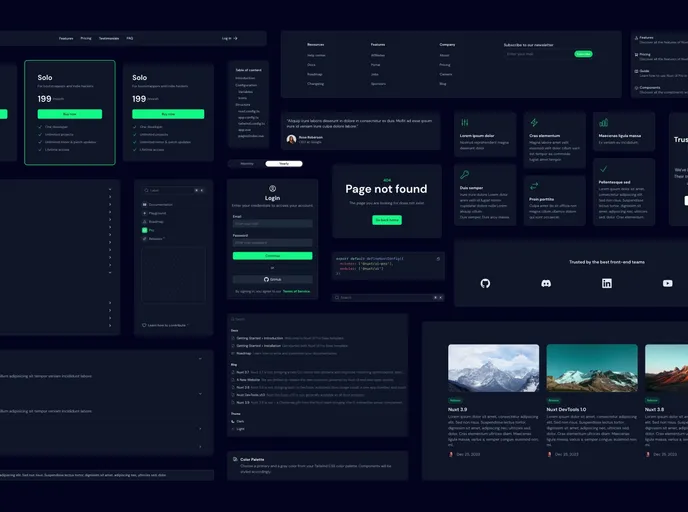
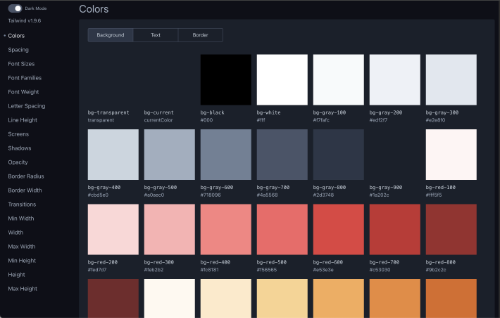
Design a UI Framework based on a design system like Nuxt UI-Pro, Tailwind CSS, or a similar tool that enforces a consistent design across all plugins and components. Create a set of base components that all plugins can leverage to maintain a consistent look and feel. These base components can include:
- Base Layouts
- Base Components
- Base Controls
- Base Modals
- Base Utilities
- Base Styles
4. Plugin System Architecture
The plugin system should be flexible and able to handle runtime installation and activation of new functionality. Here’s how to structure it:
4.1 Plugin Interface Definition
Define a common interface or API for all plugins to follow. This ensures that all plugins interact with the core application in a predictable way. An example of a base interface could look like this:
export interface PluginInterface {
  name: string;  // Unique identifier for the plugin
  version: string;
  description: string;
  category: string;  // Category of the plugin (e.g., analytics, social, etc.)
  type: string;  // Type of the plugin (e.g., widget, integration, etc.)
  install(): void;  // Function to initialize or install the plugin
  activate(): void; // Function to activate the plugin at runtime
  deactivate(): void; // Function to deactivate or disable the plugin
  renderComponent?: () => Component;  // Method to render UI components from the plugin
}
Each plugin must implement this interface to ensure it conforms to the base application's requirements.
4.2 Dynamic Plugin Loader
Create a dynamic plugin loader to handle the runtime installation and activation of plugins. This could use Nuxt's useAsyncData or other composable utilities to fetch plugin information at runtime.
import { ref } from 'vue';

export function usePluginLoader() {
  const plugins = ref<PluginInterface[]>([]);

  const loadPlugin = async (pluginUrl: string) => {
    try {
      const module = await import(/* webpackIgnore: true */ pluginUrl);
      const plugin: PluginInterface = module.default;
      if (plugin && plugin.install) {
        plugin.install();
        plugins.value.push(plugin);
      }
    } catch (error) {
      console.error(`Failed to load plugin from ${pluginUrl}:`, error);
    }
  };

  const activatePlugin = (pluginName: string) => {
    const plugin = plugins.value.find(p => p.name === pluginName);
    if (plugin && plugin.activate) {
      plugin.activate();
    }
  };

  return { plugins, loadPlugin, activatePlugin };
}
This utility allows the base application to dynamically load plugins and activate them as needed.
4.3 Plugin Registration Mechanism
Create a PluginRegistry that maintains the list of installed plugins and their states (active/inactive). This registry should be part of the global state, managed by Pinia.
import { defineStore } from 'pinia';
import { PluginInterface } from '~/plugins/PluginInterface';

export const usePluginStore = defineStore('pluginStore', {
  state: () => ({
    plugins: [] as PluginInterface[],
  }),
  actions: {
    registerPlugin(plugin: PluginInterface) {
      if (!this.plugins.find(p => p.name === plugin.name)) {
        this.plugins.push(plugin);
      }
    },
    activatePlugin(pluginName: string) {
      const plugin = this.plugins.find(p => p.name === pluginName);
      if (plugin && plugin.activate) {
        plugin.activate();
      }
    },
    deactivatePlugin(pluginName: string) {
      const plugin = this.plugins.find(p => p.name === pluginName);
      if (plugin && plugin.deactivate) {
        plugin.deactivate();
      }
    },
  },
});
5. Extensibility and Configuration
5.1 Modular Components
Components should be designed to be easily replaced or extended without modifying the core logic. For instance, use slots and scoped slots to allow child components to be replaced by plugin components.
5.2 Custom Events and Communication
Use a global event bus or Vue's built-in event mechanism to allow plugins to communicate with the core application and other plugins without tight coupling.
6. Example of a Plugin Implementation
Create a plugin that uses the common base interface and can be installed dynamically:
import { PluginInterface } from '~/plugins/PluginInterface';

const SamplePlugin: PluginInterface = {
  name: 'SamplePlugin',
  version: '1.0.0',
  install() {
    console.log('SamplePlugin installed');
  },
  activate() {
    console.log('SamplePlugin activated');
  },
  deactivate() {
    console.log('SamplePlugin deactivated');
  },
  renderComponent() {
    return {
      template: '<BaseCard><p>This is a sample plugin component!</p></BaseCard>',
    };
  },
};

export default SamplePlugin;
7. Runtime Integration
At runtime, plugins can be dynamically imported and registered using the usePluginLoader composable. This ensures that the application can adapt and load plugins without a full-page refresh.
8. Configuration Panel
Create an admin or configuration panel that lists all available plugins, shows their status, and allows the user to activate/deactivate them. This panel could be built using Nuxt UI-Pro components for consistency.
9. Deployment and Versioning
Plugin Version Control: Ensure that plugins have version constraints to prevent compatibility issues. Hot Reloading: Allow plugins to be hot-reloaded without needing a full server restart.
Summary
This architecture is built around modularity, flexibility, and extensibility. The use of a well-defined plugin interface, dynamic loading, and centralized state management with Pinia allows the application to extend its capabilities at runtime in a consistent and organized manner.
This approach will ensure that any new components or plugins will seamlessly integrate into the existing UI, conform to the application's design guidelines, and can be dynamically activated and deactivated without disrupting the overall user experience.